The Playground#️
Get familiar with CanaryBit Confidential Cloud tools for FREE
The playground gives you the opportunity to deploy and verify Confidential environments on Azure, AWS and GCP with CanaryBit Tower and Inspector, part of the CanaryBit Confidential Cloud suite.
Requirements#️
- A CanaryBit Inspector Trial licence ("Not For Resale");
- A CanaryBit account;
- An Azure, AWS or GCP account.
How-To#️
1. Source your credentials#️
In your terminal, source your CanaryBit credentials as environment variables:
export CB_USERNAME=***
export CB_PASSWORD=***
as well as your infrastructure provider credentials:
export ARM_SUBSCRIPTION_ID=***
export ARM_TENANT_ID=***
export ARM_CLIENT_ID=***
export ARM_CLIENT_SECRET=***
export AWS_ACCESS_KEY_ID=***
export AWS_SECRET_ACCESS_KEY=***
export AWS_REGION=***
export GOOGLE_APPLICATION_CREDENTIALS=***
export GOOGLE_PROJECT=***
export GOOGLE_ZONE=***
2. Deploy your Confidential environment with CanaryBit Tower#️
CanaryBit Tower comes with a set of examples that can be used to provision a secure environment in your target infrastructure.
Download CanaryBit Tower configuration for Public Cloud deployments and use the example file related to your target infrastructure.
Finally, deploy the environment following the steps documented in the Products :: TOWER page.
3. Get your environment verified by CanaryBit Inspector#️
The verification of your Confidential environment is triggered automatically when using CanaryBit Tower.
Optional: Manual verification
If manual verification is preferred, you would need to upload the CanaryBit (cb-inspector-client) agent on each Confidential VM you would like to attest.
Specifically, you would need to:
-
Install the CanaryBit (
cb) CLI tool -
Authenticate and retrieve your CanaryBit Inspector token (
$CBTOKEN):The returned temporary token will be used bycb login cbinspectorcb-inspector-clientto communicate with CanaryBit Inspector. -
Download the
cb-inspector-client:./cb download cb-inspector-client 0.1.0/cb-inspector-client -
Copy the
cb-inspector-clienton each Confidential VM. -
From each Confidential VM, run:
providingcb-inspector-client --token $CBTOKEN --environment $HW_ENV --inspector-url https://api.inspector.confidentialcloud.io$CBTOKENand$HW_ENV("snp"or"tdx", depending on your hardware chipset) as arguments.
4. View the report#️
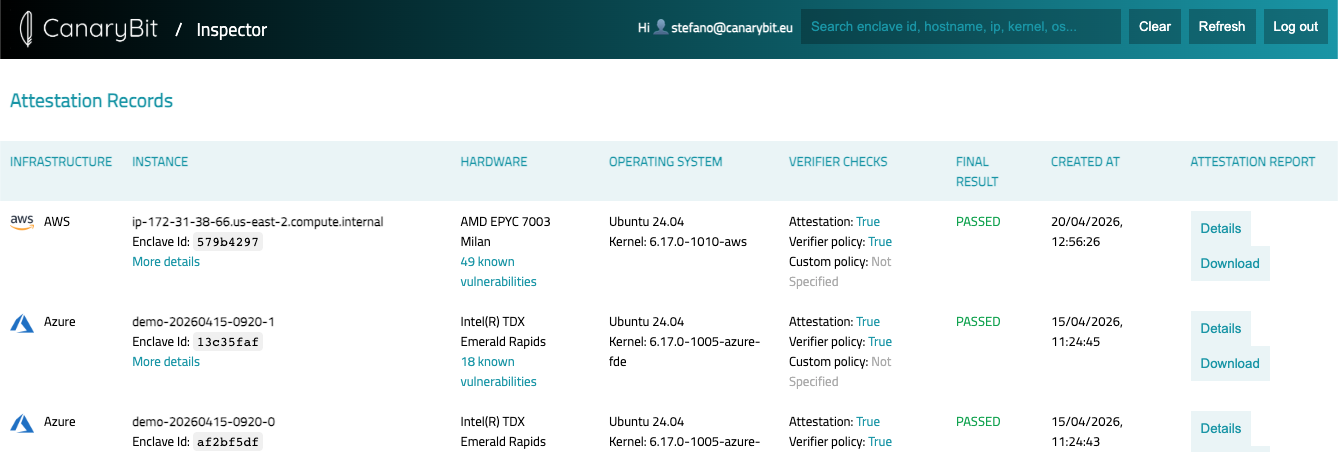
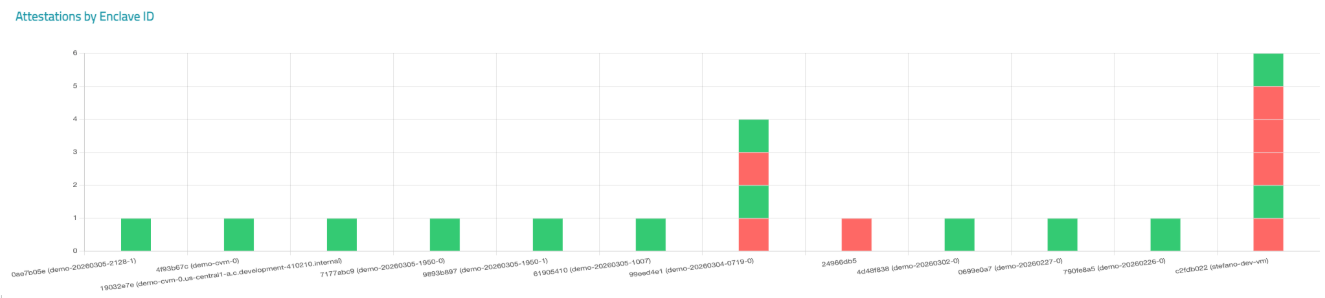
Simply log-in to the CanaryBit Inspector Dashboard to view the final report, monitor and observe the security of your environment.
List View:
Graph View:
5. Need help?#️
For custom setups, please get in touch with the CanaryBit support team. We will be happy to discuss and help you with your requirements.